Creating User Personas: A Step-by-Step Guide

Creating User Personas: A Step-by-Step Guide

Creating a successful product that resonates with your target audience is no easy feat. It takes time, resources, and a deep understanding of your users. This is where user personas come in. User personas are fictional representations of your ideal customers, based on research and data. They help you develop a better understanding of your audience’s needs, behaviors, and motivations, and guide your decision-making throughout the product development process.

In this step-by-step guide, we will explore everything you need to know about creating user personas. You will be provided with a comprehensive framework that will help you define your user personas, gather data, and create detailed profiles that truly represent your target audience. I will also share best practices and expert tips that will help you take your user-centric approach to the next level.

Whether you’re a seasoned product designer or new to the field, this guide is an essential resource for anyone looking to build better products that truly resonate with their users. By following my step-by-step approach, you’ll be able to create user personas that will guide your decision-making, improve your products, and ultimately lead to greater success.

Table of contents

  1. Introduction
  • What are User Personas?
  • Why are User Personas important?
  1. Defining User Personas
  • Identifying your target audience
  • Conducting research and gathering data
  • Developing user profiles
  1. Creating User Personas
  • Crafting personas based on user profiles
  • Identifying key characteristics and behaviors
  • Defining user goals and pain points
  1. Utilizing User Personas
  • Applying user personas throughout the product development process
  • Testing and validating user personas
  • Updating and refining user personas over time
  1. Best Practices for Creating User Personas
  • Tips and strategies for creating effective user personas
  • Common pitfalls to avoid
  1. Conclusion

1. Introduction

Creating a user persona is an essential step in developing any product or service. It help us understand our target audience by providing a fictional representation of their behavior, attitudes, goals, and motivations. This information is invaluable when designing and marketing a product or service, as it ensures that we are meeting the needs of our users.

What are User Personas?

The term persona or User Persona can be defined as a design artifact (or design deliverables) that contains the details of your target audience received via multiple research processes represented through a fictional character.

It act as a guided path that helps the design team in making design decisions while designing the product. Also, personas are not just for designers, they should be shared across the product team including management so that everyone is aligned with the target users and the decisions taken revolves around user benefits along with the business goals.

Below is a sample persona displayed.
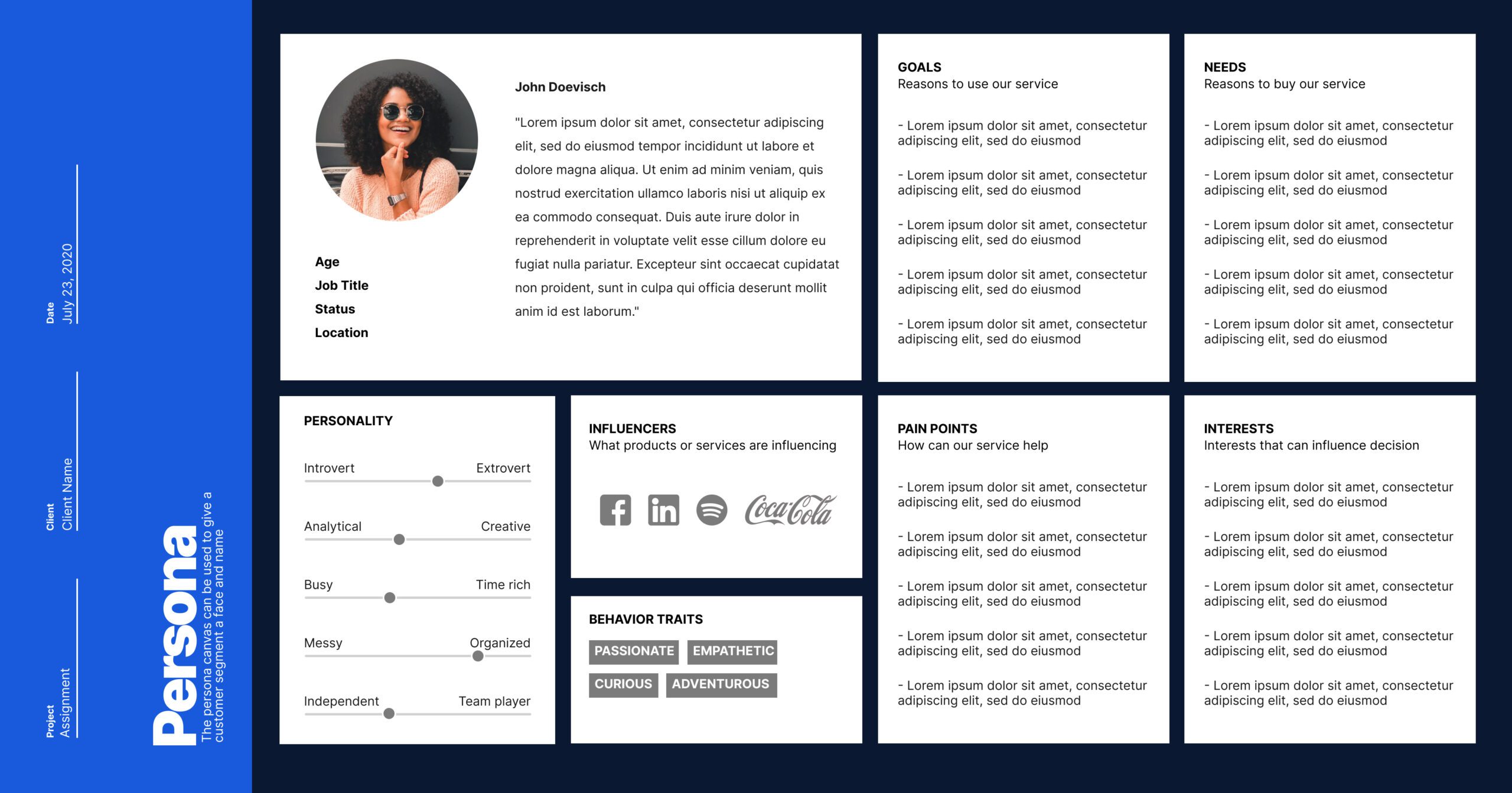
Persona

Why are User Personas important?

It provide valuable insights into your target audience’s needs, behaviors, and preferences, leading to more successful product development. Having a well-documented one provide lots of benefits not only to design teams but also to other internal stakeholders.

  • Help design teams with making smart design choices
  • A clear understanding of target users and their behaviors
  • Helps in formulating the problem statement
  • Helps in presenting the research findings with the team

2. Defining User Personas

Before you begin, it’s important to understand the purpose. What problem are you trying to solve, and how will a user persona help you solve it? Here are a few common reasons:

  • To guide product development: By understanding your users’ needs and goals, you can develop a product that meets their requirements.
  • To guide marketing efforts: By understanding your users’ behaviors and motivations, you can create marketing messages that resonate with them.
  • To guide user experience design: By understanding your users’ preferences and pain points, you can design a user experience that is intuitive and easy to use

Once you have defined the purpose, you can move on to the next step.

Defining user personas is a critical step in creating products that meet the needs of your target audience. To do this, you must first identify your target audience and gather relevant data about their preferences, behaviors, and pain points.

Identifying your target audience

The first step is identifying your target audience. This involves understanding who your product is designed for and what their needs are. You should consider factors such as age, gender, occupation, income, and geographic location when identifying your target audience.

Conducting research and gathering data

Once you have identified your target audience, the next step is to conduct research and gather data. This can include surveys, interviews, focus groups, and other research methods to gain a better understanding of your users’ behaviors, preferences, and pain points. This data will help you develop accurate and detailed user personas that capture the essence of your target audience.

Developing user profiles

Finally, you can begin developing user profiles based on the data you have gathered. These profiles should capture key characteristics and motivations of your target users, such as their goals, challenges, and behaviors. By taking a comprehensive and data-driven approach, you can create products that truly resonate with your target audience, leading to greater user satisfaction and higher levels of engagement.

3. Creating User Personas

Creating user personas is a crucial step in designing products that meet user needs and expectations. In this section, we will explore the process of crafting personas based on user profiles. This involves identifying key characteristics and behaviors of your target audience and defining their goals and pain points.

To do this, you will need to gather information about your target audience and create user profiles. This information can be gathered through surveys, interviews, user testing, and analytics.

Once you have collected these information, you can start to identify key characteristics and behaviors of your target audience. This could include their demographics, preferences, needs, and behaviors. You can use this information to create a set of personas that represent your target audience.

Finally, you will need to define the user goals and pain points of each persona. This involves understanding what each persona is trying to achieve with your product, as well as any obstacles or challenges they may face. By doing this, you can design a product that meets the needs and expectations of your target audience.

4. Utilizing User Personas

Utilizing the personas is an important aspect of the product development process. This section of the guide will cover how to apply the same throughout the product development process. 

Crafting is just the beginning. To ensure usefulness, it is essential to use the personas effectively throughout the product development process. This involves incorporating them into design decisions, feature prioritization, and usability testing. By doing so, teams can create products that better meet user needs and expectations.

Testing and validating is a crucial step in the process of creating effective user personas. It ensures that the personas accurately represent the needs and goals of your target audience. Here are some steps to follow for testing and validating your personas:

  1. Conduct user interviews: Talk to real users who fit the characteristics of your user personas. Ask them about their goals, pain points, and behaviors related to your product or service.
  2. Use surveys and questionnaires: Gather data from a larger sample size by creating surveys or questionnaires that are designed to elicit specific information related to your user personas.
  3. Analyze website analytics: Look at user data from your website or other digital platforms to see how users are interacting with your product or service. This can give you insights into how your user personas might behave in real-world situations.
  4. A/B testing: Create variations of your product or service that are tailored to your user personas and test them against each other to see which performs better.
  5. Refine your personas: Based on the results of your testing and validation, refine your user personas to ensure they accurately represent the needs and goals of your target audience.

By testing and validating you can ensure that they are an accurate representation of your target audience, and you can use them to guide your product development decisions.

As your product evolves and your target audience changes, it is important to ensure that your user personas remain up-to-date and relevant. This will help you to create products that continue to meet the needs of your users and stay ahead of the competition.

5. Best practices for Creating User Personas

Here are some tips and strategies for creating effective personas:

  1. Conduct thorough research: Conducting thorough research is essential for creating accurate and effective user personas. Gather data from various sources such as surveys, interviews, and analytics tools to gain insight into your target audience.
  2. Keep it simple: Avoid making your personas too complex by including too much irrelevant information. Focus on the key characteristics and behaviors of your target audience that are relevant to your product or service.
  3. Use real data: Use real data to create accurate and reliable personas. Avoid making assumptions or generalizations about your target audience as they can lead to ineffective personas.
  4. Validate your personas: Test and validate your personas with real users to ensure they accurately represent your target audience. You can use tools like A/B testing or user feedback surveys to validate your personas.
  5. Update your personas regularly: User behavior and needs change over time, so it’s essential to update your personas regularly to ensure they remain relevant and effective.

Common pitfalls to avoid

It is important to avoid common pitfalls that can lead to inaccurate or ineffective personas. Here are some of the most common pitfalls to watch out for:

  1. Assuming all users are the same: It’s important to avoid making assumptions about your users based on limited information. Instead, conduct thorough research to uncover user needs, behaviors, and preferences.
  2. Overgeneralizing personas: It’s easy to fall into the trap of creating personas that are too broad and don’t accurately represent your users. Make sure your personas are specific and reflect the diverse needs and characteristics of your user base.
  3. Ignoring negative feedback: It’s important to take negative feedback seriously and use it to improve your personas. Don’t dismiss negative feedback or assume that it doesn’t represent the majority of your users.
  4. Neglecting to update personas: User needs and behaviors change over time, so it’s important to update your personas regularly to reflect these changes. Failure to update your personas can lead to outdated and inaccurate representations of your users.

6. Conclusion

In conclusion, creating user personas is a crucial step in developing products and services that meet the needs of your target audience. By following the step-by-step guide outlined in this article and utilizing best practices and tips for creating effective personas, you can develop accurate and valuable user profiles that inform all aspects of the product development process. Remember to constantly test, validate, and update your personas to ensure they remain relevant and useful. With well-crafted personas, you can design products and services that resonate with your target audience and drive success for your business.

Let me know in the comments below, your experience of creating User Personas.

What you can do next?

  1. Download the PDF guide to have a checklist of all the topics that you must know if you are starting out as a UI/UX Designer.
  2. Join me on CRATER streams, where I explain in detail How to get started with UI/UX Designing.
  3. Connect with me for mentorship in UX Design.
  4. Want to build your career in UX Design, enroll in my upcoming UX Design Crash Course
  5. If you are a self-taught designer like me, then visit my Youtube channel, to explore more about UX Design
Top 10 Figma plugins to 5X your workflow

Top 10 Figma plugins to 5X your workflow

If you are someone new to FIGMA and looking to explore and learn the best plugins that you can use in your FIGMA project, then you are at the right place.

In this below article, you will learn the top 10 plugins that you can use to increase your workflow.

So let’s try to explore them.

Table of contents

What is Plugin?

Benefits of using plugins

How to install a plugin?

10 plugins to 5X your workflow

What is Plugin?

Plugins are added functionality or feature which helps to enhance your workflow in an easy way

Benefits of using Plugins

  • Enhance FIGMA capabilities
  • Reduced work time
  • Automate your work
  • Makes it easier to create certain design elements like Arcs, Graphs, etc.

How to install Plugin

To install a plugin in FIGMA, you can do it in two simple steps.

Step-1: Go to Community options

Select the Community option from the top left corner, as shown below.

Step-2: Select plugins

Search for the plugin from the Search bar on top. Filter Plugins from left. Select Try it out to install the plugin and use it in your project.

Top 10 Plugins to 5X your workflow

Below is the list of the top 10 recommended plugins to have for any designer.

Iconify

It is a great plugin from Iconify and Vjacheslav Trushkin that displays the combined list of multiple icon libraries in one single place. The settings panel of the Iconify plugin looks something like below. You can try out the Iconify plugin from the FIGMA community.

Benefits

  • Available for free and can be used in commercial projects.
  • Multiple formats like Line, Duotone, and Filled Icons.
  • Fully customizable.
Lorem Ipsum

Another great plugin by Dave Williames that allows you to generate random content for your UI elements. You can use it to generate words, sentences, and paragraphs. The settings panel of the Lorem Ipsum plugin looks something like below. Try out the Lorem Ipsum plugin from the FIGMA community.

Benefits

  • Available for free and can be used in both personal and commercial projects.
  • You can generate the exact number of words you need for your content by using the number counter.
  • One of the best features is the Auto-generate, which generates the exact number of words or sentences that fit in your frame, unlike the default Generate, which overflows the content outside your frame.
Blobs

Blobs from Dylan Feltus help you to generate custom shapes. Such shapes are mostly used as background elements for photography on websites. You can try out the Blobs plugin from the FIGMA community.

Benefits

  • Create custom shapes easily.
  • Unique shapes every time and also it gets created in vector format.
Logo Creator

Logo Creator by By Hexorial StudioDeepand Manthankumar Satani is a must-have plugin and a great resource for finding logo inspiration within FIGMA. There are different categories from which you can select the logotype of your choice. Now no need of moving out of FIGMA for finding logo inspirations. You can try out the Logo Creator plugin from the FIGMA community.

Benefits

  • Prebuild collections of logos in a variety of formats Standard Collections, Black & White, and many more.
  • Fully customizable logo in vector format.
Unsplash

Unsplash by Kirill ZakharovLiam Martensand Unsplash is one of my favorite plugins on the list. No need to move out of FIGMA now to search for high-quality free images. Just install the plugin and search for images of your choice. This plugin makes an API call to pull out the images from Unsplash official website right into your FIGMA workspace. You can try out the Unsplash plugin from the FIGMA community.

Benefits

  • High-quality images are available for free.
  • Time-saving, as we do not have to wonder about multiple places for images.
  • Can go for Unsplash+ for royalty-free images.
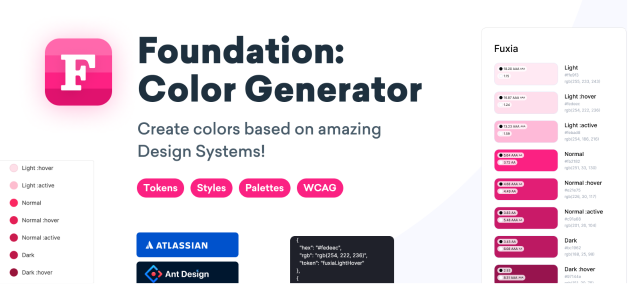
Foundation Color Generator

Another favorite on the list is Color Generator by Jorge Fernandes. You can very easily create color schemes based on Design Systems available within the tool. At present, the plugin supports four Design Systems which are Orbit, Atlassian Design System, Material Design System, and Ant Design System. Try out the Foundation Color Generator plugin from the FIGMA community.

Benefits

  • You can actually ensure colors are accessible by checking the contrast ratio right from the shade generator.
  • Generate color styles directly from the plugin
  • You can even generate the colors on multiple tones available like Dark or Surface.
Icons8 Background Remover

This plugin is another great resource to include in your plugin list. You can remove the background of any image now within FIGMA completely for free. This plugin is from Icons8 itself. Try out the Icons8 Background Remover plugin from the FIGMA community.

Benefits

  • Remove the background of any images completely for free
  • No subscription required
  • Unlimited usage to remove backgrounds
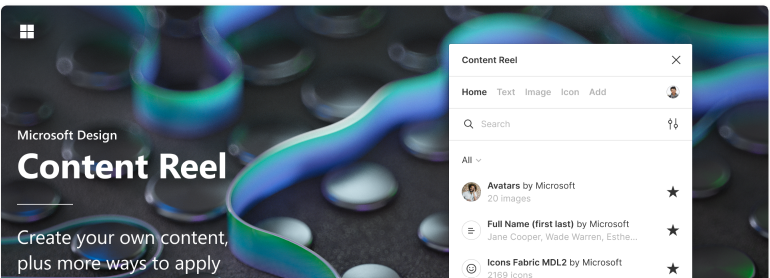
Content Reel

Content Reel is directly from Microsoft and Eugene Gavriloff. This plugin allows you to create your own content and design layouts more efficiently by pulling text strings, images, and icons. You can try out the Content Reel plugin from the FIGMA community.

Benefits

  • Create real custom content for your design mockups.
  • Search icons via picture instead of text.
  • Lots of real-looking content can be used in your designs.
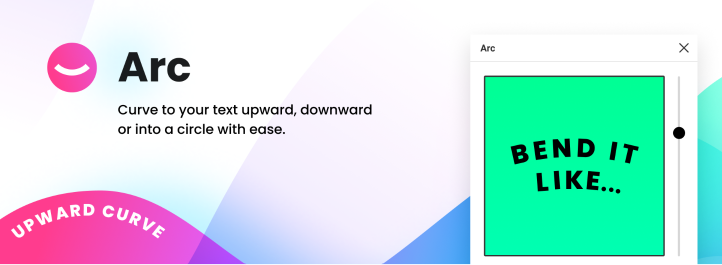
Arc

Last but not least is the Arc plugin from unfold. It is a super cool plugin that allows you to create arc-shaped text right within FIGMA. No need to go for Photoshop or Illustrator. And thanks to the community once again for bringing this out. You can try out the Arc plugin from the FIGMA community.

Benefits

  • Create curved-shaped text for free.
  • Can create both upwards and downwards-curved text.

UX Design Fundamentals

Join the 5-week intensive mentorship program where you will learn about UI/UX Design completely from scratch which includes topics like User Research, Prototyping, Wireframes, and Design tools.

Check out the actual implementation of each plugin from the above list in the video below.

Conclusion

Well, congrats 🎉✨for completing the article, and by now you must have got a fair understanding of what plugins are and their benefits. Also, some of the commonly used plugins can help you in your design workflow.

Let me know in the comments below which is your favorite plugin from the list above and what other plugin you use in your daily design work. Catch you soon in my next article.

What you can do next?

  1. Download the PDF guide to have a checklist of all the topics that you must know if you are starting out as a UI/UX Designer.
  2. Join me on CRATER streams, where I explain in detail How to get started with UI/UX Designing.
  3. Connect with me for mentorship in UX Design.
  4. Want to build your career in UX Design, enroll in my upcoming UX Design Crash Course. Learn more about the program.
  5. If you are a self-taught designer like me, then visit my Youtube channel, to explore more about UX Design

Top 5 UX design books to read in 2022

Top 5 UX design books to read in 2022

If you are a UX Designer or someone like me who loves to read a lot, then below are some of my recommended UX Design books that you should definitely read.

Of course, reading books can be boring and I understand that completely. But below mentioned are some of the bibles that are worthy of your time.

Let’s explore why you can also invest some of your quality time as well.

The Design of Everyday Things

Written by Don Norman, the founder of UX Design. This book can be considered a bible and a must-read for designers who are just starting out in the design industry. It explains a lot of design principles and regular day-to-day UX problems we encounter in our daily life.

The one area of this book, which I liked the most was Chapter 7: Design in the world of Business. This chapter speaks about how UX is incorporated into today’s business environment and how it should be actually practiced.

Click the image below to get your copy now.

Design Sprint

Design Sprint book has been written by ex-Googler Jake Knapp who invented the process of Design Sprint while working on major Google products like Gmail and others.

This book provides detailed guidelines and steps as to how you can follow the process in your own project or organization.

Click the image below to get your copy now

Laws of UX

Click the image below to get your copy now.

UX for Lean Startups

Click on the image below to get your copy now.

101 UX Principles

Click on the image below to get your copy now.

Specialist in UI/UX Design

Join the 5-week intensive mentorship program where you will learn about UI/UX Design completely from scratch which includes topics like User Research, Prototyping, Wireframes, and Design tools.

Wrapping Up

Well, congrats 🎉✨for completing the article, and thanks for sticking around.

Let me know in the comments below which is your favorite book from the list above and what other books you have read related to UX Design. Catch you soon in my next article.

What you can do next?

  1. Download the PDF guide to have a checklist of all the topics that you must know if you are starting out as a UI/UX Designer.
  2. Join me on CRATER streams, where I explain in detail How to get started with UI/UX Designing.
  3. Connect with me for mentorship in UX Design.
  4. Want to build your career in UX Design, enroll in my upcoming UX Design Crash Course.
  5. If you are a self-taught designer like me, then visit my Youtube channel, to explore more about UX Design

The ultimate guide to UX Research

The ultimate guide to UX Research

Collecting user feedback is the key pillar to any successful product and for that you need to conduct ux research. Either you are a beginner level designer or a seasoned pro, it could be difficult at times to select the appropriate research methods. The key to conduct a successful research needs proper planning.

However, there are multiple other factors that needs to be considered while making your research plan like timeline, budget, etc. And I can bet you will not have unlimited amount of time for the same in real project.

In this article you will explore multiple ways of conducting research, checklist and step-by-step guide explaining when to use which method and how to present results with your stakeholders. So let’s get started.

Table of contents

  1. Introduction
      • What is UX Research?
      • Benefits of UX Research?
  2. Understanding the Role of a UX Researcher
      • Key responsibilities of a UX researcher.
      • Differentiating UX research from UX Design
      • Salary overview
  3. Types of UX Research
      • Understanding different research methods
      • How research methods are used in Product development
  4. Planning and Conducting UX Research
      • Techniques to identify research goals
      • Step-by-step guide to create a research plan
  5. Analyze Research Findings
      • Types of analysis
      • Importance of research findings
  6. Applying UX Research to Design Decisions
      • How research findings influence design decisions
      • Techniques for translating research insights into design solutions.

Introduction

What is UX Research?

UX Research (aka User Experience Research) is a process of capturing and understanding users challenges, motivations, goals, needs, etc. while interacting with the product. The primary goal is to inform and guide the design process by uncovering valuable insights about users.

By conducting UX research, designers can make informed decisions that result in user-centric design solutions, leading to improved user satisfaction, engagement, and overall product success.

Benefits of UX Research

1. Understanding of users

You can get a deeper understanding of user needs, preferences, and pain points, etc. by doing user research. It can be difficult at times to get stakeholders support. With data-driven design it can be easier, as you will have data to back your suggestion.

2. Validating design decisions

As a designer you need to ensure that your design decisions are solving users problem and you can do that by gathering feedback and testing design concepts with real users. This process of iterative feedback will reduce the risk of developing ineffective solutions and make your design choices more data driven rather than assumptions.

3. Improving usability

As a designer you need to ensure that your design decisions are solving users problem and you can do that by gathering feedback and testing design concepts with real users. This process of iterative feedback will reduce the risk of developing ineffective solutions and make your design choices more data driven rather than assumptions.

4. Enhancing user engagement

As a designer you need to ensure that your design decisions are solving users problem and you can do that by gathering feedback and testing design concepts with real users. This process of iterative feedback will reduce the risk of developing ineffective solutions and make your design choices more data driven rather than assumptions.

5. Business success

As a designer you need to ensure that your design decisions are solving users problem and you can do that by gathering feedback and testing design concepts with real users. This process of iterative feedback will reduce the risk of developing ineffective solutions and make your design choices more data driven rather than assumptions.

Understanding the role of UX Researcher

Now that your are aware of what research is and its associated benefit, let us try to understand what a researcher does in their day-to-day work. In this section, we will try to uncover what kind of work you will be doing in this role, how this role is different from other disciplines and ofcourse 😀 the financials, how much you can make.

Key responsibilities of UX Researcher

UX Research (aka User Experience Research) is a process of capturing and understanding users challenges, motivations, goals, needs, etc. while interacting with the product. The primary goal is to inform and guide the design process by uncovering valuable insights about users.

By conducting UX research, designers can make informed decisions that result in user-centric design solutions, leading to improved user satisfaction, engagement, and overall product success.

Differentiating UX Research from UX Design

UX-Research-vs-UX-Designer

Salary overview

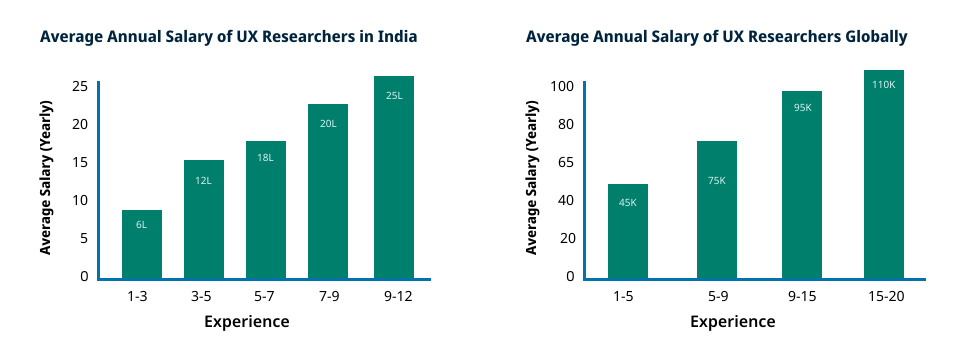
The insights shown below are the representation of data from Ambitionbox & Glassdoor. The actual data might vary when you’re reading due to multiple reasons. So readers should not consider this as the exact match during job search.

Average Annual Salary UX Researcher

Types of UX Research

In this section we will learn the different research methods used in practice by UX Designers or UX Researchers and how you can implement them in your project.

Understanding different research patterns

Having good understanding on the different research methods is essential as it can help you select the appropriate method for your project. The choice of your research method depends mainly on the type of information you are trying to capture including your project goals. So let us see these research patterns and gain the knowledge needed to select the appropriate ux research method. You can also jump to learn about top 12 ux research methods or continue reading below.

Types of Research Methods
Generative research

Generative research is one of easiest research method that helps you in getting better understanding of user needs, preferences, and behaviors. It helps in gathering insights and generating ideas to inform the design process.

The primary purpose is to generate ideas and concepts that drive the early stages of the design process. By using this technique and the methods associated with it, you will able to learn things as below:

  • In-depth details about user’s action, thoughts and feeling
  • Can provide guidance on creating the information architecture of your product.
  • You can also get an insight into how your users behave and interact with their surrounding in their day-to-day life.

Generative research can be carried out in any stage of product life cycle. But ideal to use before product development as a way to capture requirements or in the early stage of the design process to evaluate an existing design.

Some of the common methods are user interviews, field studies, diary studies and stakeholder interviews.

Evaluative research

Evaluative research as the name suggest is used to evaluate a product feature or concept from usability prespective, measure the feature or product effectiveness, user satisfaction and improve the experience.

The goal of using this technique is to measure the effectiveness of your product by following an iterative design approach, where design changes and improvements are made based on user feedback and insights leading to continuous enhancement of the product. By using this technique, you will be able to learn insights as below:

  •  Gather quick feedbacks addressing usability issues  
  • Data-driven decision by reducing assumptions and relying on actual user feedback and behavior.
  • Supports an iterative design approach, where design changes and improvements are made based on user feedback and insights
  • Increased user satisfaction

Some of the common methods are Usability testing, Tree testing, Accessibility test, etc.

Quantitative research

Quantitative research is a method of gathering user data and measureable insights in a large quantity so that it helps researchers analyze trends, patterns, and statistical significance across a broader audience. Qualitative research often goes together with Quantitative research.

The purpose is to provide quantifiable insights that help inform design decisions, evaluate the impact of design changes, and measure user satisfaction. Some of the common types of quantitative results include:

  • Time taken on task completion
  • CES
  • SUS
  • Users choice on A/B testing

Methods used are: Usability testing, A/B testing, Surveys

Qualitative research

Qualitative user research is a method used in UX design to gather in-depth insights and understanding of user experiences, behaviors, and perceptions. The purpose of this method is to capture our users detail like pain points, goals, motivation as much as possible either either by observing them or doing interviews.

Some of the common research methods include:

  • User interviews
  • Focus group
  • Ethnographic study
  • Grounded theory
Attitudinal research

Attitudinal research is a qualitative research method that focuses on understanding people’s attitudes, beliefs, opinions, and motivations. It focuses on understanding the why behind people’s behaviors and seeks to uncover their subjective thoughts and feelings. By exploring attitudes, attitudinal research provides valuable insights into user preferences, emotions, and perceptions, which is helpful in design decisions.

Behavioral research

Behavioral research is a quantitative research method that examines and analyzes observable behaviors of individuals or groups. It aims to understand how people act, react, and make decisions in various contexts. By studying actual behaviors rather than relying solely on self-reported data, behavioral research provides valuable insights into user actions, patterns, and interactions. This empirical approach helps inform the design process by uncovering user behaviors, preferences, and usability issues, leading to the development of more effective and user-centered solutions.

How research methods are used in Product development?

The type of user research you want to do depends on the stage of your product development as each stage of your development has different research objectives and different question that needs answering.

Research methods used in Product Development

Planning & conducting UX Research

Before you actually start conducting your research, there needs to be a good plan which should answer some of the below questions:

  • What you want to learn by conducting the research? Is it about product, user, or any problem?
  • For whom you want to conduct the research, like stakeholders, etc.?
  • Assumptions and hypothesis that needs to be validated

Planning and understanding research goals

Before starting of your research work you should always create a research plan which generally consists of details like research goals, participant criteria, who will assist you in research, format of research insights, timeline, etc. But for doing right planning you need to understand the goals for research. Some of the goals for conducting UX research can be:

  • Understanding user needs, preferences, challenges, etc.
  • Trying to evaluate the usability issues of the product
  • Gain insights for decision-making
  • Identify areas of improvements

To understand the research goals you can follow these 3 simple steps:

  1. SMART – Your research goals or objectives needs to be Specific Measureable Achievable Relevant Time-based
  2. Keep limited number of goals, the less is always better
  3. Get stakeholder buy-in, approved by all stakeholders

Step-by-step guide to create a research plan

Guide to create a Research Plan

Analyze research findings

By now you already know how to create your research plan and conduct the same. In this section you will learn the different techniques to analyze your research findings.

Types of analysis

You have done all your hard work of meeting with users collecting valuable insights but its not the end. The real work actually starts now where you need to refine or convert those raw data into some actionable key findings which you would like to share with your team, stakeholders also anyone who might be interested. So to help you with the analysis of your data, I have two very interesting methods that might be helpful.

1. Atomic research model

Atomic research developed by Daniel Pidcock is the most simple method of analyzing your research data in just four simple steps. This method follows a linear process breaking down information and insights into smaller bite sized information which contains more useful information. Long story short, atomic research follows the concept of breaking knowledge down into its constituent parts as below:

  • Experiments: What types of studies has been carried out which can be like user interviews, usability testing, surveys, etc.
  • Facts: What you found out or facts gained from experiments like any quote, observation or statistic.
  • Insights: What you learned or why you think you found this, which could be either of cause, context or effect or could be a combination of all
  • Opportunities: How you can improve the experience and come to conclusive statements to provide actionable recommendations.

Additional resources, to learn more about Atomic Research model.

Talk: “Atomic UX Research for agencies” with Daniel Pidcock

Atomic UX Research – Considerly

Guide to Atomic Research

2. Thematic analysis

Thematic analysis is a method in UX research to analyze and interpret data. It involves identifying patterns, themes, and key insights within the collected data to gain a deeper understanding of user experiences and perceptions. It is a powerful method for uncovering rich insights and patterns within qualitative data in UX research. Below is a five step guide to use in your project.

  1. Get yourself acquinted with your research data
  2. Look for codes to group data into themes
  3. Create themes across all research experiments or user interviews
  4. Create a story against all themes
  5. Report the findings

Importance of research findings

The ultimate goal of conducting any research is to have key findings that could shape your design project into context. Also it helps stakeholder prioritize the feature development keeping both user and business context. Below are some of the importance research findings:

  1. Increased conversion rates: UX research findings help optimize the user experience, leading to improved conversion rates. For example, implementing design changes based on research insights may result in a 20% increase in conversion rates on a website or app.
  2. Reduced user errors: Helps in identification of usability issues and pain points, leading to a reduction in user errors. For example: a product may experience a 30% decrease in user errors, resulting in a smoother and more efficient user experience.
  3. Increase in customer satisfaction: Inform design decisions that prioritize user satisfaction. For example: implementing changes based on user feedback may lead to a 40% increase in customer satisfaction ratings.

P.S. The specific metrics mentioned above are hypothetical and can vary based on the nature of the product, target audience, and research findings.

Applying UX research to design decisions

In this section you will learn how research findings are implemented in actual design.

How research findings influence design decisions

The research findings play a crucial role in influencing design decisions by providing valuable insights into user needs, preferences, and behaviors. Here are some ways research findings influence design decisions:

  1. Identifying pain points and usability issues
  2. Helps in feature prioritization 
  3. Allows iterative design process
  4. Supports with quantitative data

Techniques for translating research insights into design solutions

 After all UX is all about providing great experience to your users. To provide such experience you need to conduct good research. And good research means getting actionable insights which is then prioritized by your stakeholders for actual implementation. Here are three ways that can help you translate your research insights into design solutions.

  1. Focused research goals so that when the insights are presented it can be prioritized for development
  2. Have the stakeholders engaged all times through out the research process
  3. Align with your team ideate or do brainstorming on specific findings for next steps.

Download your research toolkit

Use this free toolkit in your next project to plan your research, select the right method by framing great research questions.

Conclusion

UX Research is a very interesting domain. If done right can have tremendous benefits for your product or service. There is not set rules as to how and what research methods to follow. It depends on your project requirements and also what you want to learn and why.

Download the free toolkit which can act as a started guide in your next project and don’t forget to like, share and subscribe.

Frequently Asked Questions

What is UX Research?

UX Design is an iterative method of solving users problems. The ultimate goal of UX is to make products functionable and enjoyable to end users.

What is the difference between UX Research vs User Research?

Both the process needs interacting with users or people. However, UX Research tries to understand how users interact with the product like any Usability Issues. While user research tries to understand behaviours, goals, challenges, etc. of user

Can I become a UX Researcher without a design degree?

While certification can provide a bonus in your resume and good to have a structured learning, but it’s not mandatory. 

How much does a UX Researcher make in salary?

When it comes to salary, there are multiple factors to consider like job level, role that your hired, organization, etc. According to Ambitionbox review, an average salary of 10 LPA is paid out for an entry level candidate. 

P.S This number might differ when you are actually viewing the article based on market situations.

Can I become a UX Researcher without a design degree?

UX Design is an iterative method of solving users problems. The ultimate goal of UX is to make products functionable and enjoyable to end users.

What you can do next?

  1. Download my free UX Research toolkit for your next project
  2. Download the UX roadmap to get started in UX Design
  3. Join my free upcoming short course in UX Design
  4. Visit my Youtube channel to learn more on UX Design
  5. Schedule a 1-1 call for mentorship in UX Design

A comprehensive guide to 6D web design process

A comprehensive guide to 6D web design process

Web Design is an awesome job that seems to be very lucrative and simple. There are a lot of things that you will learn and evolve, but having a well-defined process can help you work much easier.

There are a lot of questions, I have received personally about what process I follow for my web design projects and what is the best process that needs to be followed. Well, to answer that there is no size fits for all, and there is no right and wrong. However, in this article, I have mentioned the process that I mostly follow in my web design project, just to give you all an idea of what steps you might be included in your process as well.

The process I follow, I call it 6D Web Design Process. And, if you want to know why, then stick till the end of this article. What you will be learning in this article?

Table of contents

#What is Website Design?

#Benefits of websites

#6D web design process

What is Website Design?

Web Design or website design is the art of designing and developing webpages using web technologies like HTML5, CSS3, Javascript, Bootstrap, etc. Not only that, web design also includes multiple other aspects which is often overlooked. Some of them are website copy, security of the website, user experience of ther website, etc.

In this article, I will share the detailed process of my web projects. How I qualify a project to work with, process and tools used during project. The process I follow is 6D Web Design process

6D Web Design Process

    The process starts with a Discovery Session. In this stage we mostly try to understand the client, their goals, requirements, any specific challenge they are struggling with that they need help with. More specifically, I try to analyze if both of us are the right fit to work together.

    Analyzing and introspecting of a project and the client is very important, because you do not want to be in a situation where you get stuck with a project and spoil your reputation. Or another situation could be there is an incremental project scope in the same budget from the client. Either way, it is you taking risk and struggling.


    My top 3 ways to create a WOW Discovery session with clients
    1. Engaging contact formsInstead of collecting only contact information, you can include questions like their project goals, budget expecations, etc. And contact details can be collected at a later stage. View the contact form of my website for inspiration.

      2. Schedule a call

      Call schedule is a more engaging way of connecting with your client. As you are not only gathering the essential informations related to project. But also empathizing with the client by providing them the flexibility to connect with you at their own sweet time. It also shows your professionalism and customer focused, as the client does not have to wait for extended time.

      3. Client Questionnaire

      This process is more related to those, who still does not have an online portfolio, or website. But is also super useful for everyone to have. Create a questionnaire with all the important details you need to know in the first meeting, so that you do not seems unprepared. Grab my template for client meeting questionnaire.

    Web Design Specialist

    Join the exclusive mentorship program where you will learn about designing & developing a website in Web 3.0 standard using no-code tools.

    Derive

    The Define stage is crucial, as in this phase, we create the functional specifications define the project scope (what can be done and what cannot). Once we are aligned on the project requirements, budget, timelines, I go with sharing the proposal with all details, along with terms. So that we can remain accountable to each other. I also create a client dashboard, which includes all project details like project documents, plan, tasks, invoice details and share with client. Most importantly, we also define the success criteria for the project also known as KPIs (Key Performing Index). Some of the recommended tools mentioned below

    • Trello (Free)
    • Project Proposal template
    • Notion (Free)
    • Invoice Template

    Define

    This stage is optional, but mostly needed for projects, where we do not have any digital elements like color palette, tone, typogrpahy, and branding elements. In this stage, I conduct strategy workshop with the client stakeholders, and deep dive into their business, by trying to understand their vision, user problems they are trying to solve, brand awareness plan, competitive analysis and market research, if any. 

    Recently I worked on a Website Development project, where the client was providing services to multiple categories. But did not had branding elements and was also unable to define their story. For which I conducted a strategy workshop and created their complete brand elements and story. The challenging part for me was to define their customers and figuring the problem they were solving. Case study coming soon!

    The workshop can be done online on in-person, depending on client or your presence. Some of the recommended tools:

    In this stage, I also start with creating the Userflow or Information Architect depending on the type of the project. The idea of creating these artifacts are to determine the information to be included against each section of the website or app. Some of the recommended tools:

    • Figma
    • Invision
    • Miro

    Design

    Ahh design! The most challenging and excited phase of the complete process. I generally start with collecting design inspiration for both web and app projects. Some of my recommended design inspiration platforms:

    Depending on project, I sometime create a Moodboard or Stylesscapes as shown below. This actually helps me to align with the client expectations on the type of visuals I think should go with their brand personality. 

    KPB-Stylescape

    Actual stylescape of a cloud kitchen brand. View complete case study here

    After the visual identity alignment, I start with creating digital wireframes. Wireframes actually help me to brainstorm on the content layout, the different elements to be used on the UI (User Interface) and the interactions needed against each of the UI elements.

    Once the version of the wireframe is finalized, the visuals are created using brand elements like color scheme, typography, etc.

    Some of the deliverables in this phase could be:

    • Style guide
    • Hifi Mockups
    • Prototypes

    Learn more about the design deliverables.

    Develop

    Depending on the project requirements, it goes to the product team for actual implementation with code and functionality. Sometimes, the functional implementation is also taken care by me or shared to client for development. Some of the recommended tools for design handoff:

    • Figma
    • Adobe XD
    • Zeplin

    The benefits of using these design handoff tools, is we can provide annotations, prototypes and with actual design specifications. So that developers understand the complete flow and interactions that needs to be implemented.

    Deploy

    Projects that are functionally coded and verified goes live. Post which the analysis are done depending on the success criteria. And if required, enhancements are done. Also, some of the projects are considered for ongoing maintenance at an agreed monthly subscription.

    Wrapping Up

    Well, congrats 🎉✨for completing the article, and by now you must have got a fair understanding of all areas you need to focus, learn and grow if you are taking project as a freelance.

    And if you are planning to land a job, then you need to have an understanding of all of the above-mentioned areas, create your portfolio, and prepare for interviews. The process I just shared above is not a one size fits for all project and client. You need to improvise depending on project requirement.

    See you in next article!